by garyg
14. September 2011 22:21
I recently got a question on this and it seemed useful enough for a post to my blog. They installed TFS without initially integrating with SharePoint. They had many projects that don't contain SharePoint portals. Then they integrated SharePoint with TFS and can only set up a SharePoint portal with new projects created. Is there any way to create a SharePoint portal for existing TFS projects? Are there any workarounds to achieve this goal?
The answer is yes and yes, and there are a few options to get this done:
Depending on how many you have to do there are two basic approaches that I've used. To begin you need to be in the Project Administrators group or have the View Collection-Level Information and Edit Collection-Level Information permissions set to Allow.
Manual Method, good if you just have a few. Follow the instructions one MSDN here: http://msdn.microsoft.com/en-us/library/dd386320.aspx . Basic steps are:
1.In Team Explorer, right-click the name of the project, point to Team Project Settings, and then click Portal Settings.
2.On the Project Portal tab, select the Enable project portal check box.
3.Click Use this SharePoint site, and then click Configure URL.
4.In the Web application list, click a SharePoint Web application.
5.In Relative site path, type the relative path of an existing SharePoint site.As you type the path, it appears at the end of the value in URL.
6.In URL, click the link, verify that the path is correct, and then click OK.
7.If you want this SharePoint site to show data for this project, select the Reports and dashboards refer to data for this team project check box.
8.Click OK.
Scripting with File.BatchNewTeamProject, more complex but creates the reports as well and good if you have a bunch to do at once. I did a few hundred in fairly short order using this method. Follow the detailed steps here http://msdn.microsoft.com/en-us/library/ff462695.aspx .
by garyg
16. August 2011 22:03
It would be great is TFS had a nice Web Service to do this, logged to the event log, etc, and there is some additional logging you can turn on but I've always found this a pain. One thing you can do (especially if you know what you are looking at for commands that suspect have been run) is the tbl_command table in the Collection DB. For instance if you suspect a witadmin command has been run you can use something like this SQL query:
1: select * from tbl_Command with (nolock)
2: where useragent LIKE 'Team Foundation (witadmin.exe%'
The usual precautions would apply here, like not running direct DB queries durring peak production times etc. but it allows you to quicly see a list of whats been run against TFS. The Command column has a record of the command that was run. When I had an issue at client of someone running unauthorized commands I was able to use this to track down the person quickly.
by garyg
12. July 2011 09:34
I responded to a post recently on one of the MSDN TFS forums regarding a question from a user trying to upgrade from Team Foundation Server 2008 to Team Foundation Server 2010. His question was related to trying to do a delta DB copy after an initial successful upgrade to try and speed the process (it can take 8 hours or more for the full upgrade). (see tfs 2010 re-upgrade)
There is no supported way to achieve this, but it also made me recall another very important tip: Shut down ALL TFS related services and app pools before making your TFS 2008 DB backups to move to your new server (I’m assuming you are migrating to different hardware in this case).
This ensures everything is in sync for the backup. If you don’t, there is a chance a record in one of the DB’s could be updated before you have a chance to complete the backup. I’ve seen the results of this first hand and it was both difficult to diagnose and expensive. Your upgrade will proceed normally and you wont know there is a problem until you try and create a new team project, or create a new work item.
by garyg
18. April 2011 11:33
It would be great if every self-organizing team just jumped right in and did just that, but some do need a little help. Most new groups will traverse through the standard storming – forming – norming stages, and its mainly during the first two you’ll need to help the most. The biggest challenge for any of us who have lead traditional teams face in facilitating a self-organizing team learning how to facilitate without dropping into traditional management behaviors.
My first realization to this came one morning at a Daily Scrum when listening to the team members report their status to one another. It was obvious to everyone in the room that there was an extreme imbalance in the workload and a few members User Stories were falling behind. They were struggling. At the end of the Scrum I expected one or more of them to offer assistance to the struggling members. I was wrong. I don’t know why, but I expected these formally very independent people to suddenly step up and help one another out simply because the rules and principles of Scrum had been laid out for them. The people hadn't changed because the process did.
Coming to the rapid conclusion that they just didn’t know how to start helping one another, and fighting the urge to drop into delegating PM mode, I stayed in the facilitating Scrum Master role, bringing up the Burn Down and Capacity charts instead and asked questions. Very pointed questions on what they thought the numbers meant
Leading the team to correct realization on their own rather than telling them what to do, helped them take the first leap. It seems like a simple step, but for this group it was the turning point for coming to grips with a key responsibility of a self-organizing team.
So what specifically can you do to help your Agile team to the “right” conclusions? Here are a few tips I’ve put together from my experiences:
- Highlight issues by bringing them up for discussion. Encourage team members to vocalize the solution on their own rather than you pointing it out.
- Get impediments out of the way. Make sure you aren't one of them. Facilitate communications but avoid being a go-between if at all possible.
- You are not the Admin, do not become one. Insist that all artifacts be created by the Team. It encourages ownership and responsibility.
- When everything is right, it will seem like you do nothing at all. Once the Team gets some experience and success behind them you should do very little other than truly facilitating .
by garyg
23. March 2011 10:40
Just completed the Professional Scrum Master training with Ken Schwaber at Scrum.org. I’d been practicing Scrum for some time so I wasn’t sure how much net gain I get, but definitely glad I made time for this. What a course! Great content and very engaging training from one of the industries legends. If you have the chance I would highly recommend it for any Scrum practicing PM, Development Manager or anyone looking to gain a deeper understanding of Scrum and how to apply it properly. Most valuable for me (since I’m serving as the Scrum Master on a few teams) was the real world tactical advice and “how to” practice points from Ken directly. The hands-on exercises were both entertaining and enlightening with the wide variety of companies represented.
by garyg
7. November 2010 23:36
So we are in the final go/no-go hour for a product release, and its not looking good. My team had been charged with testing the product for last 3 day. The development team was busy playing wack-a-mole with several P1 and P2 bugs that continued to regress. Our QA team had no involvement at the beginning of this cycle, nor visibility to any hard requirements (I know, not a good start). A particularly nasty P1 that appears to be in the framework of the product, is on its 4th try through the regression testing cycle. This is one that the developer was sure he had it “this” time. My confidence of course was not there, and I recommended this release be pulled.
The client of course was not happy and called an emergency meeting to get a handle on what was happening. We were now going over the exact contents of what was supposed to be in this latest release, feature by feature. Seeing the impending revelation creeping upon him the developer finally revealed there may be something “a little extra” in this code. Something completely off the requirements list, project plan, and of course did not go through the fairly rigorous code review this client normally does. We were unwitting victims of a classic Gold Plating gone wrong situation and nearly done in by the Midas Touch of unchecked development without matching requirements. No malice of intent but the results were the same.
How this situation was resolved isn’t important, but how we could have prevented it is. A simple, solid, Requirements Traceability Matrix combined with some training on early recognition of Gold Plating signs was on my list of recommendations. I’ve often seen the costs of Gold Plating represented by actual extra work and schedule overruns. This was the clearest case I’ve seen to date were it directly caused a quality issue of this magnitude. A good lesson for us all.
by GaryG
20. July 2010 05:33
I know I usually write about Project Management related topics so I ask my regular readers to please bear with me. This one was a real pain to solve so I wanted to share it since TFS 2010 is fairly new and and error its giving out doesn’t really help. Recently while working with an enterprise client in a TFS2008 to TFS2010 migration (a real pain in itself) we came across an error in setting up the Team Build Service. The topology here put the TFS application tier on one server and the Team Build Service on its own machine (a Windows 2008 Server), and both the Controller and Agents were on this machine.
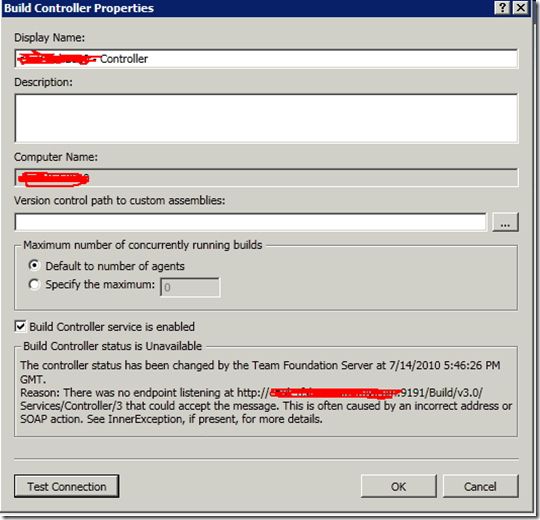
The problem we saw was that the the controller and agents couldn't connect (and of course all the team builds failed). The error was:
"There was no endpoint listening at http://somemachine.company.com/Build/v3.0/Services/Contoller3 that could accept the message. This is often caused by an incorrect address or SOAP action. See InnerException, if present, for more details."
The error was displayed in the properties dialog for both the Controller and Agent as in the below screenshot:
After a lot of head banging, setting up traces, and a reinstall I realized that for some reason the configuration wizard put the FDQN (Fully Qualified Domain Name) rather than the machine name. Having debugged an issue on another products Web Service I decided to change it to use just the Machine Name and it instantly connected both the Controller and Agents.
This fix is simple thankfully. Change the local build service endpoint to NOT use a FQDN but just the machine name, restart the Build Controller and Agents.
To do this just get into the TFS Administration Console on the Build Server and click the Build Configuration node. From here click the Properties on the Build Service and you will get the following window:
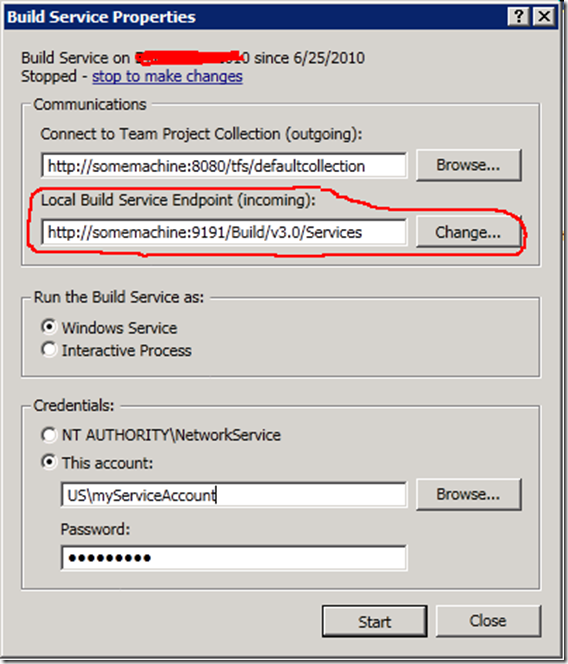
The “Local Build Service Endpoint (incoming)” will be grayed out until you click the “stop to make changes” link. Click the link to stop the service then click the Change button to change just the FQDN to the machine name. From here just click the Start button and your Controller and Agents should be talking fine. It may take a minute once you restart the Build Service for everything to reestablish communication. I hope this helps someone on another TFS 2010 deployment.
by garyg
11. June 2010 11:07
While I’m sure we’d all rather avoid defects in our software all together, in a sufficiently complex application bugs (or regressions as we also call them) are as inevitable as death and taxes. As an old mentor used to tell me, if you aren’t failing some of the time, you aren’t trying hard enough. The trick of course is catching them before the risk they present is fully realized, i.e. in front of the end user in a production environment. Finding and remediating bugs falls under Project Quality Management in PMBOK (Project Management Body of Knowledge, Chapter 8).
So as long as you have them, you might as well get your moneys worth out of them. Here’s how. A “bug” in your software system represents a defect that needs to be remediated in some way, as effectively as you can, and without breaking anything else in the system. So how do we achieve that ? Well we need to find them early first with good testing in a well managed development cycle, but that's the subject of another future post. Once we have located them we need to properly assess them. At a minimum you want to know:
- What the defect is and what it impacts in the system. This begins with a thorough description of the problem observed. We are looking for a well written observation here, more than just a “its broken” but shorter than your system specification. A paragraph should be about right.
- How do you reproduce it. If the developer cant reproduce it, likely it will get closed as a “non reproducible” bug and will be a complete waste of time for everyone involved. Be as exact as possible with clear steps and any particular data needed.
- Screen Shot or Video. Window 7 has the built in Snipping Tool, but there are a lot of them out there. The idea is a visible representation of what you just described. Full motion video is even better for complicated issues. Microsoft has Expression Encoder 4 available for free , but there are many out there.
- Priority and Impact. I’m a big fan of two level assessment of defects. The first level, Priority should indicate how bad the problem on a numerical scale. P1 meaning there is no way you can go forward without releasing it, down to P4, an inconvenience. Impact should indicate what the financial or effort based impact of this error is (I-1 to I-4). Will it take 5 weeks to fix or do we just need to comment out a line. Often the original tester will not be able to assess the Impact, but this should be done by the person triaging the defects. In a project management capacity this really represents Qualitative and Quantitative Risk Assessment. More on this two level system concept in a future post.
- How did we fix it. This is a critical step. After a resolution is developed and verified, you need to detail it right in the defect document. While we don’t need the source code here, you should link or reference the change set that fixed it. Also, always be on the lookout for a best practice or new design pattern that worked well in approaching this defect or one that didn’t. This is about building up your knowledgebase.
One last parting thought on defects. While there are hundreds of theories and best practices on Software Quality Assurance and reducing bugs (and certainly worthwhile). I like to remind people of a famous quote from Thomas Edison on the thousands of failed attempts to create the light bulb: “I have not failed. I've just found 10,000 ways that won't work.” As long as we keep that in mind and learn from the mistakes we make during the creation process, we can indeed extract value from them rather than just writing them off as just being a costly byproduct.
by garyg
26. May 2010 11:43
I’ve gotten a lot of questions from people lately on what a project charter is, and what elements they should include in one to create a good one. Created under the Initiating Process Group under PMBOK (Project Management Body of Knowledge), it is the one of the first steps performed once you have the initial concept for a project nailed down. I’m going to cover the basics here of what it is, key features, and just as important, what it is NOT.
The “official” definition is a document that formally authorizes a project or phase of a project (for larger ones) and captures the initial requirements that satisfies the stakeholder expectations. This can also be an iterative document that further defines or validates the decisions made in previous phases. Items that are used to build the charter include:
- Statement of work
- The Business Case
- Enterprise Environmental Factors (corporate culture, government regulations, infrastructure, stakeholder risk tolerances, etc.)
- Organizational Process Assets (standard processes, templates, historical info, financial data, etc.)
- The Contract (may not have one if you are an internal team)
The main thing you want to keep in mind while building the Project Charter is that it is not a replacement or extension of the contract. You need to things in plain business speak as much as possible. We will undoubtedly be pulling items from the contract, but it needs to readable and tell a fluent but brief story that clearly conveys the business value. You will also want to cover any significant risks, and the costs of course. The goal we are aiming for is authorization to proceed with project as described.
One question I from internal project teams working within a larger company is what to do about a contract. Most of the time it wont exist and getting one signed isn’t going to happen. The PMBOK doesn’t really cover that situation except for the obvious, if it isn’t there you can’t use it. I would suggest that you could refer to your groups charter (if you have a long standing and well written one) at this point and make specific references to it in your Project Charter.
Lastly you need to consider a signature section. For projects with an external group I consider it a must. For internal groups you need to let your company culture be your guide. If your company requires signatures on PO’s and other internal agreements they you’ll want to make sure that you are gathering them on the Project Charter as well. If not, a simple acknowledgement of receipt (i.e. email) by all authorizing parties may suffice.
by garyg
10. April 2010 10:05
This has to be one of the most heated debates I’ve ever seen play out in recent memory. Recently someone asked this question on a LinkedIn PMP only discussion (later deleted by LinkedIn) group. This is sort of one of those Red vs. Blue questions and your ability and experience tends to shape your opinion in this area.
In a perfectly executed large 250+ resource project following the PMBOK (Project Management Body of Knowledge) processes you should be able to rely solely on the science, process, and SME’s (Subject Matter Experts) while you concentrate on the business of Project Management. Actually you’d be foolish to think your individual technical contribution would even put a dent in the plan in a truly large scale multi-year project. Lately however, these ideal situations and projects are less the norm and more the exception as organizations are more likely to be concentrating on the smaller, rapid ROI projects in the portfolio.
More often than not some balance needs to be struck. Either you can’t completely rely on your SME’s, your teams knowledge ends up light in an area you are strong in, or the project is just too small and fast moving for you not to be a little more “hands-on”. In these cases as a PM your ability to jump in along side your team (as long as you aren’t losing sight of your primary role as PM) could only be an asset.
Also if you are Crashing or Fast Tracking (schedule compression techniques) a project, and requiring your team work into a holiday weekend, you’d better be prepared to put in some work product yourself or risk being compared to the Pointy Haired Boss ;-).
So do I think we’ve settled the debate here ? Not by a long shot. However if we can generate some lively and useful discussion (especially among our stakeholders) than it is worthy of engaging.
 Subscribe